
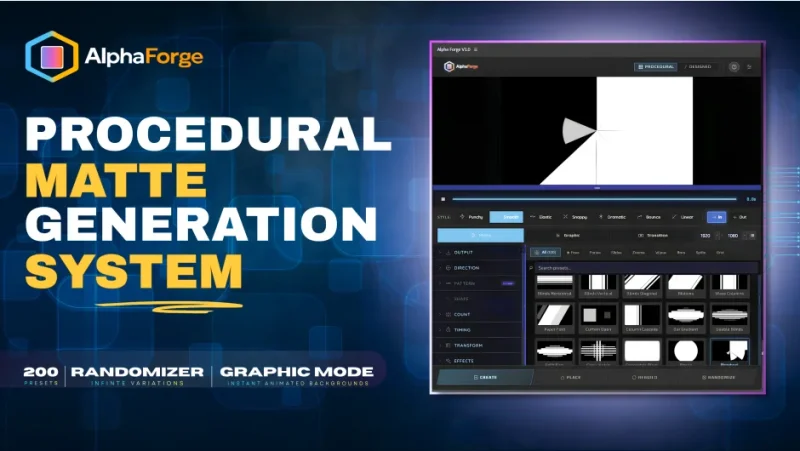

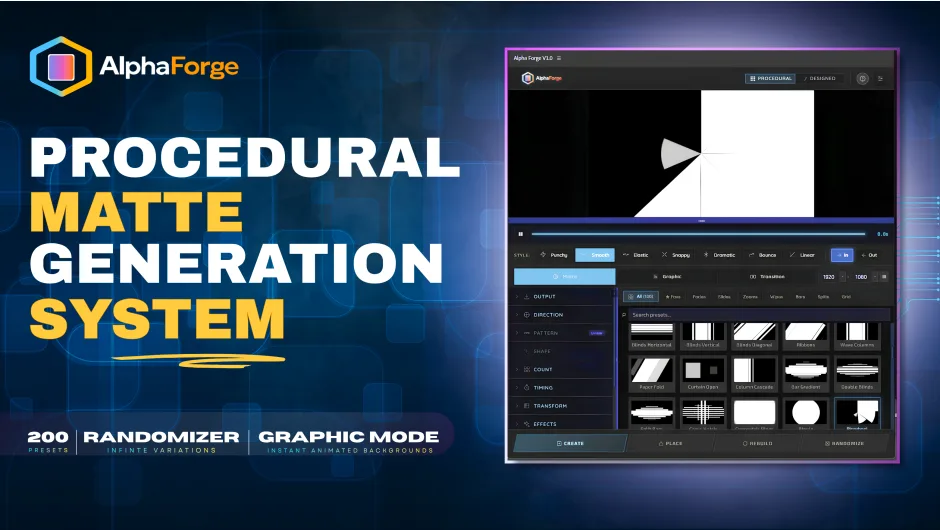
官方一句话:“Matte & transition generator for After Effects that builds animated mattes, graphics, and transitions in seconds — 200 presets, no keyframing.”(After Effects 的 matte 与转场生成器:几秒内做出动画 matte、图形与转场——200 个预设,不用 K 一根关键帧。)
官方副标题:Procedural mattes, graphics & transitions — generated in seconds.(程序化 matte、图形与转场——几秒生成。)
官方描述:
AlphaForge is a procedural generator for After Effects that builds animated mattes, graphic elements, and transitions right inside your comp. Pick a mode, dial in a few controls, and AlphaForge does the rest — fully non-destructive, endlessly variable, and render-ready. Built for motion designers and editors who need broadcast-quality reveals and backgrounds without hand-keyframing a single shape layer.
(AlphaForge 是 After Effects 的程序化生成器,直接在你的合成里做动画 matte、图形元素与转场。选个模式、调几个控件,剩下的 AlphaForge 来做——完全非破坏性、变化无限、可直接渲染。为需要广播级揭示与背景、又不想手 K 任何一个形状图层的动效设计师与剪辑师而做。)
一、三种模式
面板顶部 data-mode 有三个主模式(另有 signature 为第二种工作方式):
- Matte —— 生成动画 track matte 做揭示
- Graphic —— 生成全彩图形元素(按钮文案变成
CREATE GRAPHIC) - Transition —— 在两个镜头之间做转场(按钮文案变成
CREATE TRANSITION)
二、两条工作路线(官方「TWO WAYS TO WORK」)
Dynamic — fast, randomized results you can reshuffle endlessly
Signature — precise, hand-tuned looks you can save and recall
- Dynamic(动态)——快,随机结果,可以无限次重新洗牌
- Signature(签名)——精确、手调的外观,可以保存并召回
三、官方三大特性
1. RANDOMIZER · 200 PRESETS —— One click, infinite on-brand variations
Hit Randomize and AlphaForge reshuffles into a brand-new, coherent matte — counts, timing, and motion shift together while staying on-brand. Browse 200 presets across grids, waves, scatters, wipes, and radials, lock a seed you like, and it’s reproducible forever.
(点 Randomize,AlphaForge 就洗成一个全新的、协调的 matte——数量、时序、运动一起变,同时保持风格统一。在 200 个预设里浏览网格、波形、散布、擦除与放射,锁定你喜欢的 seed,就永远可复现。)
2. MATTES · GRAPHICS · TRANSITIONS —— Reveal, composite, transition — all editable
Generate animated track mattes for reveals, full-color graphic elements, or ready-to-use transitions between two clips. Here a matte reveals a portrait over a second shot — and every layer stays a native, editable After Effects layer.
(生成动画 track matte 做揭示、全彩图形元素、或两个镜头之间现成可用的转场。这里一个 matte 让人像在第二个镜头上方揭示出来——而每个图层都保持为 After Effects 原生可编辑图层。)
3. DIRECT CONTROL · 20+ PARAMETERS —— From three sliders to total control
Start with the core sliders — Count, Duration, Stagger — then refine across 20+ parameters spanning Timing, Transform, Effects, Echo and Color. Simple to start, deep when you need it.
(从三个核心滑杆开始——Count、Duration、Stagger——然后在 20 多个参数里细化,横跨 Timing、Transform、Effects、Echo 与 Color。起步简单,需要时能很深。)
四、200 个预设的实际构成(从包里数出来)
包内两个预设文件,各 100 个,合计正好 200,与官方说法一致。
presets.js(Dynamic,100 个,7 类)
| 类别 | 数量 |
|---|---|
| grid | 29 |
| zooms | 18 |
| bars | 15 |
| wipes | 13 |
| slides | 11 |
| splits | 11 |
| fades | 3 |
代表预设名:Concentric Open / Iris Rings / Push / Cascade / Diagonal Sweep / Grid Reveal / Brick Build / Hex Drift / Flip Open / Curtain Draw / Converge / Weave / Zipper Merge / Grid Linear / Grid Center Out / Grid Checkerboard / Grid Snake / Grid Diagonal / Grid Rain / Blinds Horizontal / Blinds Vertical / Blinds Diagonal / Ribbons / Wave Columns / Paper Fold / Curtain Open / Column Cascade / Bar Gradient / Double Blinds / Split Bars / Cross Hatch / Concentric Rings / Ripple / Pinwheel / Clock Wipe / Spiral Bloom / Target / Hex Radial / Triangle Mosaic / Shattered Glass / Scatter Spin / Split Horizontal / Split Vertical / Split Quad / Cross Split / Diagonal Wipe / Diagonal Wipe / / Peel / Zipper / Frame Expand / Corner Cascade / Stroke Frame / Diamond Burst / Nested Squares / Domino Fall / Shockwave / Scale Bounce / Rotate Grid / Isometric Cubes / Blur Focus / Tumble Blocks / Grid Implode / Defocus Hex / Dissolve / Gradient Fade / Radial Fade / Zoom In / Zoom Iris / Zoom Grid / Zoom Spin / Zoom Bars / Zoom Warp / Zoom Crash / Zoom Bounce / Zoom Tunnel / Zoom Hex / Zoom Vortex / Zoom Drift / Zoom Shatter / Zoom Pull / Zoom Diagonal / Zoom Rush / Zoom Tilt / Zoom Mosaic / Logo Spiral / Slingshot Grid / Drift Reveal / Cubic Slam / Chevron Stack / Hex Domino / Diamond Shutter / Sweep / Iris / Barn Door / Venetian / Star Spiral / Radial Fan / Honeycomb Fill。
presets-signature.js(Signature,100 个,5 类)——文件头写明 100 Presets in 5 Categories:Wipes & Reveals、Rings、Bars & Blinds、Grids & Tiles、Wedges & Radial。
- sig-wipe-*(13):clean / corner / diagonal / wave / soft / multi / pendulum / curtain / split / comb / brushsweep / smokecurtain / pixelrain
- sig-iris-*(5):zoom / aperture / diamond / portal / spiral
- sig-bars-*(20):venetian / barn / rolling / swing / column / equalizer / stretchsnap / pendulum / bookturn / panels / diamond / expand / bracket / chevron / depthstack / diagslice / cascadeoverlap / loomweave / gravityrain / gaussiancurtain
- sig-grid-* / sig-grids-*(27):bounce / domino / ripple / cascade / mosaic / sweep / lattice / pulse / wave / dissolve / zipper / spiral / slash / shatterburst / fractalsplit / flipboard / warpgrid / mazeflood / morphgrid / shinglelayer / hexagon / diagonal / brick / checker / pixel / dots / diamond
- sig-ring-*(17):clockwipe / dualsweep / tunnel / halodraw / sectorbloom / fold / vortex / dotring / spirallock / interlace / drop / gyro / ringsectors / concentriczoom / ringzip / ringshutter / stackedrings
- sig-wedge-*(6):fan / burst / sectors / fanunfold / spokecollapse / blinds
- 其他:sig-diag-45-lr / sig-diag-criss-cross / sig-3d-cubes / sig-flip-discs / sig-starburst / sig-elastic / sig-spiral-draw / sig-crosshatch-arcs / sig-pinwheel / sig-arc-propeller / sig-arc-iristwist / sig-wedges-kaleidoscope
Signature 侧栏还有形状筛选 pill(rect、circle、ring、wedge、grid 等)。
五、Signature 控件模板(代码里的默认值)
duration 滑杆:默认 3,1–10,步进 0.5,单位 s,section timing
stagger 滑杆:默认 50,0–100,步进 5,单位 %,section timing
count 滑杆:默认 6,3–12,步进 1,标签 Elements,section layout
origin 下拉:默认 center,标签 Origin,section layout,选项 Center / Top / Bottom / Left / Right / Top Left / Top Right / Bottom Left / Bottom Right
intensity 滑杆:默认 30,0–100,步进 5,单位 %,section feel
六、Dynamic 侧控件(从 index.html 读出)
主滑杆:Count / Duration / Stagger / Intensity / Hold / Out / Sides / Aspect / Roundness / Thickness / Points / Width / Gap
Animation:In / Out
Transform:Scale Start / Scale End / Opacity Start / Opacity End / Rotation Start / Rotation End / Move From X / Move From Y / Blur Start / Blur End / Overshoot / Bounce / Influence
Echo & Trails:Echo Count / Echo Delay / Falloff / Scale Offset
Color Accent:Mono(Hue / L-Min / L-Max)、Palette(Cycle / Position / Random)、Duotone(A / B)、Gradient(Linear / Radial + Angle)、Random(Warm / Cool / Pastel / Full + Saturation)
Fill:Solid / Gradient / Monochrome / Duotone / Palette / Random
Background:Solid / Gradient / Transparent(+ Hex / Picker / Angle)
Modifiers(5 种场):Radial / Linear / Wave / Noise / Vortex
Output 段:⟳ SHUFFLE、CREATE、PLACE、REBUILD、RANDOMIZER
侧栏分组(index.html 的 section id):OUTPUT / DIRECTION / PATTERN / SHAPES / COUNT / TIMING / TRANSFORM / EFFECTS
Signature 专有:Stroke(Width / Gap / Dash / Taper Start / Taper End)、Style Intensity、Transition(Softness / Motion Blur / Fade to White / Multi-Overlay / Place Overlay)、Time display、Favorites
七、关键能力
- Non-destructive Rebuild——「改任何东西,原地重新生成」(官方原文)
- Favorites & keyboard shortcuts(官方 BUILT FOR ITERATION 段)
- Dockable panel——可停靠面板,常驻工作区
- Rebuild System——官方教学视频第 4:44 专门讲这个
- Variations Popup——变体弹窗(官方教学 36:13)
- Randomized Section——随机区,Minimal vs Wild 两档(官方教学 42:04),另有 Seed Value 功能(45:03)与 Advanced Randomization Options(46:21)
- Compsize modal——合成尺寸变更提示(Keep current / New / Proceed)
- 相机 3D 控制(官方教学 32:03)、Color Accent(34:06)
- Total Comp 时间显示:tp-dur-a / tp-dur-b / tp-dur-m / tp-dur-total / tp-bar-a / tp-bar-b / tp-bar-m(In / Hold / Out 三段配进度条)
- 渲染引擎:Canvas 2D(rect / circle / donut / hexagon / star / triangle 等形状)+
three.min.js3D(render3d.js)+ 自研 animation.js
安装(随包 read.txt 原文):1)把 com.alphaforge.v1 文件夹拷到 C:Program Files (x86)Common FilesAdobeCEPextensions(Win)或 System Disk / Library / Application Support / Adobe / CEP / extensions(Mac);2)Windows 运行 Add Keys.reg 一次,Mac 运行 install-as-admin 一次;3)在 AE 设置里勾选 Allow Scripts to Write Files and Access Network(AE CC 2019.1 及以后在 Preferences → Scripting & Expressions,此前在 Preferences → General);4)打开 AE,顶部菜单 Window → Extensions → AlphaForge。
manifest 要点:CSXS 11.0,HostList <Host Name="AEFT" Version="[22.0,99.9]"/>(AE 2022+),MainPath ./index.html,ScriptPath ./jsx/host.jsx,AutoVisible true,菜单 AlphaForge,面板 300×700(min 280×400,max 600×2000)。CEF 参数:--enable-nodejs、--mixed-context、--allow-file-access-from-files、--ignore-gpu-blacklist(manifest 注释说明:为在老/被拉黑的 GPU 上拓宽 WebGL 支持,不强制软件渲染;面板在 WebGL 不可用时会回落到 2D,所以不覆盖渲染器原生 GPU 选择)。
版本核对:本包版本 1.0.1(manifest ExtensionBundleVersion 1.0.1、目录名 com.alphaforge.v1、psdly 标题 V1.0.1,三方一致)。
价格与授权:官方价格 $49.00(Single User License;另有 Floating Server License);官方提供 FREE TRIAL。官方来源 aescripts.com/alphaforge/,作者 Matte Forge Systems。
官方兼容与随附:After Effects 2022 (v22.0)+、Windows 10/11、macOS 11+。官方随附 Signed ZXP(aescripts manager 一键装)、Install & Quick-Start PDF、200 presets · Dynamic + Signature modes、aescripts license manager 授权。
本夸克目录内容:com.alphaforge.v1/(CEP 扩展本体:index.html、15 个 CSS、app.js、CSInterface.js、js/bridge/ae-bridge.js、js/core/ 11 个模块、js/engine/ 7 个模块、js/lib/three.min.js、js/presets/ 2 个预设文件、js/ui/ 8 个模块、icons/)、Add Keys.reg、install-as-admin.zip、read.txt、Winextensions.lnk、cover.png、README.md。共 78 个文件 / 8056308 字节,与本地逐字节一致。
参数来源说明:200 个预设的 id 与名称、7+5 分类、控件名与默认值、三种模式、Dynamic/Signature 两条路线、Rebuild System、Favorites、Variations Popup、Randomized 两档、Modifiers 五种场、Color Accent 五种配色方式、Compsize modal、相机 3D 控制、CEF 参数与面板尺寸,均来自包内明文 index.html、js/app.js、js/presets/presets.js、js/presets/presets-signature.js、js/engine/*.js、CSXS/manifest.xml、read.txt;官方描述、三大特性、价格 $49.00、FREE TRIAL、兼容 AE 2022+/Win10-11/macOS 11+、Signed ZXP 与教学视频目录,均来自 aescripts 官方页。非推测。
原产品页:https://aescripts.com/alphaforge/
封面图片来自作者官方产品页。本文为中文整理,功能与兼容性信息以作者官方页面与包内说明为准。资源仅供学习交流,商业使用请购买正版授权。











暂无评论内容