
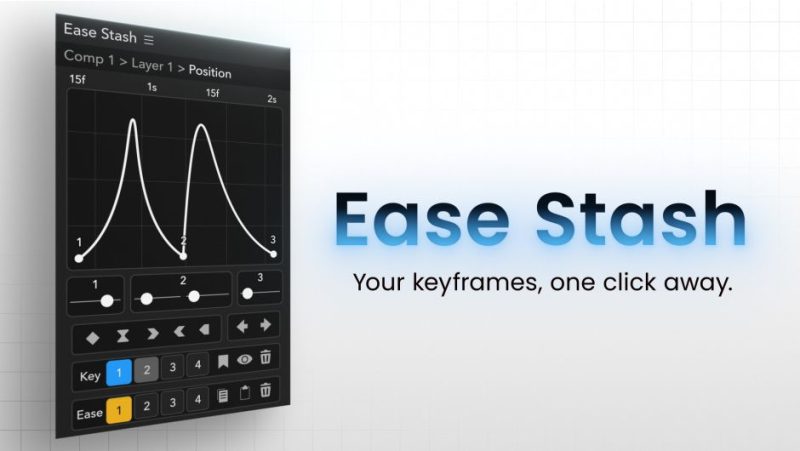

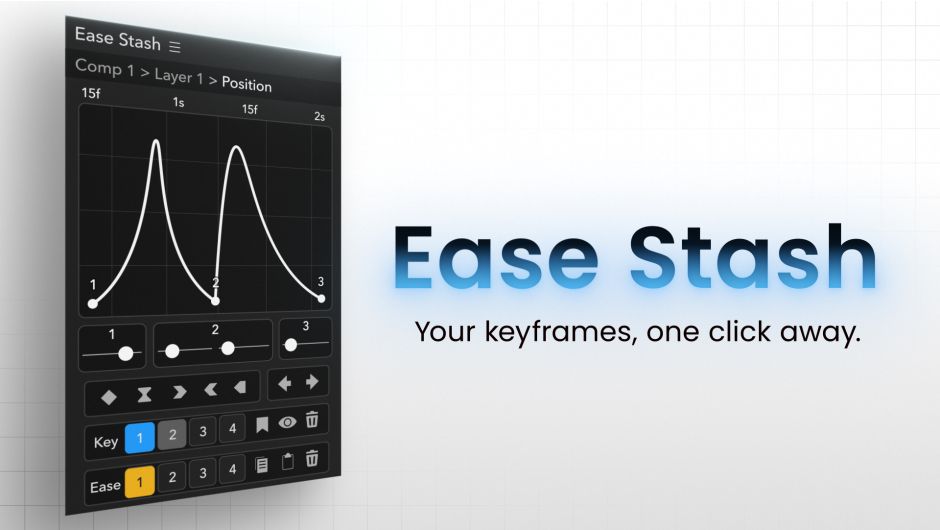
官方一句话:“Your keyframes, one click away. Stash your keyframe selections, recall them anytime, and edit easing right in the panel. No Graph Editor required.”
(你的关键帧,一键即达。把关键帧选区存起来,随时召回,直接在面板里改缓动。不需要图形编辑器。)
这是 null1 lab 的 AE 缓动面板扩展(原名 Ease Graph,2026-06-11 改名为 Ease Stash)。它切入的角度和大多数缓动工具不一样——不是给你一堆曲线预设,而是把「你选中的那些关键帧」本身存下来。
这个差别在实际工作里很实在:长项目里你会反复回去调同一批关键帧,每次都得在时间线里翻找、重新框选。Ease Stash 把这些选区存成槽位,一键召回,直接从任何合成里跳回去。
一、Hover:悬停即编辑(官方原文)
“Select keys and hover over the panel to instantly display the easing graph. Shape curves with the sliders, and the changes are reflected in your comp in real time.”
(选中关键帧、鼠标悬到面板上,就立刻显示缓动曲线图。用滑杆改曲线,合成里的变化实时反映。)
也就是说不开图形编辑器也能调曲线,这是官方标题里 No Graph Editor required 的意思。
二、Multi:最多 8 个属性一起编辑(1.1 新增,官方原文)
“Overlay color-coded speed graphs for up to 8 properties and edit them together: drags, interpolation switches, and nudges apply across properties and layers at once. Slots and Reveal support multi-property selections too.”
(最多 8 个属性的速度曲线叠加显示、带颜色区分,可一起编辑:拖控制器、切插值方式、微移关键帧,都同时作用到所有选中属性与图层。存槽和 Reveal 也支持多属性选区。)
包内代码实证:main.js 里有 easestash_getLockedSnapshotMulti(、easestash_pasteEaseValuesMulti(、easestash_revealPropertyMulti( 三个多属性接口,以及报错串 "Too many properties (max 8)",与官方说法一致。
三、Stash:一键召回(官方原文)
“Save a keyframe selection to a slot and recall it instantly, eliminating repetitive reselection. The keys you keep coming back to are always one click away.”
(把一次关键帧选区存到一个槽位,之后一键召回,不用反复重新框选。你反复回访的那些关键帧永远只差一次点击。)
四、Across:跨合成(官方称之为 CORE FEATURE)
“Recall and edit saved slots from any composition. Adjust animations that span multiple comps without ever switching between them. It truly shines on large-scale projects.”
(在任何合成里都能召回并编辑已存的槽位。跨多个合成的动画不用来回切换合成就能调。官方说这个能力在大型项目上最能体现价值。)
这条和「槽位不跨工程保存」要一起看——见下方 FAQ:工程开着的期间,槽位在该工程所有合成里都可用;关掉工程就清空。
五、Reuse 与 Jump(官方原文)
- Reuse — “Stash easing curves and apply them to other keys or properties for consistent motion.”(把缓动曲线存下来,应用到别的关键帧或属性上,保持运动一致。)
- Jump — “Jump from a stashed key straight to its original layer and property with one click.”(从槽位里一键跳回它原本所在的图层与属性。)
六、它和别的缓动工具的根本区别(官方对比表原文)
官方专门做了一张对比:
| MOST EASING TOOLS(大多数缓动工具) | EASE STASH |
|---|---|
| 存曲线预设:一堆形状,你把它应用到关键帧上 | 存「选区本身」。一键回到那些确切的关键帧,从任何合成里都能 |
官方原话:“A fundamentally different approach that solves the real bottleneck of repetitive access. It doesn’t replace your favorite easing tools. It complements them, and it transforms how you work on long-form, large-scale projects.”
(一个根本不同的思路,解决的是「反复访问」这个真正的瓶颈。它不替代你喜欢的缓动工具,而是补足它们;它改变你在长篇、大型项目里的工作方式。)
七、官方 FAQ 五问(原文要点)
槽位里存了什么? “A slot remembers your keyframe selection. Recall it and you’re back where you were instantly, ready to edit.”(槽位记的是你的关键帧选区。召回后立刻回到当时的位置,可以马上编辑。)
槽位跨工程保存吗? “No. Slots are cleared when you close your project or open a different one. While your project is open, they stay available across all its compositions.”(不会。关闭工程或打开别的工程时槽位会被清空。工程开着的期间,它在所有合成里都可用。)
删掉图层会怎样? “The slot will show an error state, since the original keyframes no longer exist. Simply clear it with the delete button and stash something new.”(槽位显示错误状态,因为原关键帧不存在了。用删除按钮清掉、重新存一个就行。)
能同时编辑多个属性吗? 能,v1.1 起最多 8 个属性叠加速度曲线、带颜色区分,拖控制器、切插值、微移都同时作用到所有选中属性与图层。
支持哪些属性? “Almost everything you’d normally ease: position, scale, rotation, opacity, anchor point, colors, mask and shape paths, and numeric effect parameters (sliders and similar). A few special properties without easing (like checkboxes, 3D orientation, or text content) are not supported. The panel will show “Not supported” for those.”(基本上你平时会做缓动的都支持;勾选框、3D 朝向、文字内容等本身没有缓动的属性不支持,面板会显示 Not supported。)
八、官方演示视频章节(原文)
- 0:00 Edit Eases Without the Graph Editor(不开图形编辑器改缓动)
- 0:11 Save & Recall Key Selections(存与召回关键帧选区)
- 0:45 Rename, Add Keys, Precompose – Still Tracked(重命名、加关键帧、预合成之后仍然跟踪)
- 1:14 Copy Eases Across Properties(跨属性复制缓动)
- 1:46 Faster with Shift & Cmd(Shift / Cmd 快捷操作更快)
- 2:00 Multi-Select, Interpolation, Nudge(多选、插值、微移)
- 2:12 Tips & Limitations(技巧与限制)
九、安装与授权
安装:本包是 Windows 侧 CEP 扩展目录,把 com.null1lab.easestash 整个目录放进 CEP 扩展目录 C:Program Files (x86)Common FilesAdobeCEPextensions,或用包内 install-as-admin.zip 的方式装。重启 AE 后从「窗口 ▸ 扩展」打开 Ease Stash 面板。
授权:官方 Single User License $35.00,另有 Floating Server License,并提供 FREE TRIAL 免费试用。商业使用请购买正版:aescripts.com/ease-stash。
版本核对:本包为 1.1.0,三处一致——压缩包名 Ease_Stash_v1.1.0.rar、包内目录名 Ease_Stash_v1.1.0、CSXS/manifest.xml 里 ExtensionBundleVersion="1.1.0" 且 ExtensionList 中 com.null1lab.easestash.panel Version="1.1.0"。
与官方最新版的关系:官方页面当前最新版也是 1.1.0(2026-08-28 发布),官方 VERSION HISTORY 只有这一条,内容就是多属性支持(最多 8 个属性叠加速度曲线、跨属性与图层同时编辑、多属性选区存入 Key stock 槽位、Reveal 会选中全部已存属性)。本包即官方最新版。
兼容性实证:官方 COMPATIBILITY 栏为 After Effects 2026 / 2025 / 2024;包内 manifest.xml 的 HostList 是 AEFT [24.0, 99.9](AE 2024 = 24.0 起),RequiredRuntime CSXS 11.0,ExtensionManifest Version="11.0"。
为什么砍掉 AE 2023(作者注释原文):manifest 里的日文注释说明,AE 2023(23.x)的面板标题栏绘制比其它版本更厚,是 AE 本身的机制问题(作者试过改 manifest 各种写法都无效),所以为了保证观感只支持 AE 2024+。同时注明 layer.id API 在 AE 22+ 就能用,砍掉纯粹是面板边框绘制问题。这是作者注释,不是官方产品页文案。
改名历史(manifest 注释原文):2026-06-11 「Ease Graph」→「Ease Stash」(= ストック機能を強調する名前に統一)——为了突出「存(stock/stash)」这个能力而改名。
本夸克目录内容:完整解压包 Ease_Stash_v1.1.0/(com.null1lab.easestash/ 扩展本体含 host/EaseStash.jsx 163031 B、js/main.js 104786 B、js/graph.js 89914 B、js/drag.js 20147 B、lib/CSInterface.js、lib/cs-core.js、icons/ 五态图标、META-INF/signatures.xml;以及 install-as-admin.zip、Winextensions.lnk、Add Keys.reg、EaseStash_v1.0.0_Installation.pdf)、cover.jpg、README-中文.txt。共 67 个文件 / 2793172 字节,与本地逐字节一致。
一处文档命名不一致(如实标注):包内安装说明 PDF 的文件名是 EaseStash_v1.0.0_Installation.pdf,写的是 v1.0.0;但扩展本体(manifest、目录名、压缩包名)都是 1.1.0。这是作者沿用了旧版文档的命名,以扩展本体版本为准。
槽位数量实证:main.js 里有 readKeySlotCount() / readEaseSlotCount() 与 keySlotCountVisible = (n === 8) ? 8 : 4 的逻辑,对应 Key stock 与 Ease 两类槽位,可见槽位数可在 4 / 8 之间切换,偏好项键为 easestash.v3.keySlotCount 与 easestash.v3.easeSlotCount。
文案来源说明:官方一句话、Hover / Multi / Stash / Across / Reuse / Jump 六项功能描述、与其它缓动工具的对比表、五条 FAQ 原文、演示视频七个章节、价格 $35.00 与兼容版本,均来自 aescripts 官方产品页;ExtensionBundleVersion、HostList AEFT [24.0,99.9]、CSXS 11.0、改名历史、AE 2023 不支持的原因均来自包内 manifest.xml;多属性接口名、"Too many properties (max 8)"、槽位数量逻辑来自 main.js 实证。以上均非推测。
原产品页:https://aescripts.com/ease-stash/
封面图片来自作者官方产品页。本文为中文整理,功能与兼容性信息以作者官方页面与包内说明为准。资源仅供学习交流,商业使用请购买正版授权。












暂无评论内容